 /SLASHPLAY
Garry's Mod server console commands
The Garry's Mod server commands worth knowing: maps and gamemodes, Sandbox limits like sbox_maxprops, noclip, bots, kicks and bans, and a lasting server.cfg.
Read the transcript
This audio was created with Boson AI's Higgs Audio: boson.ai/higgs-audio
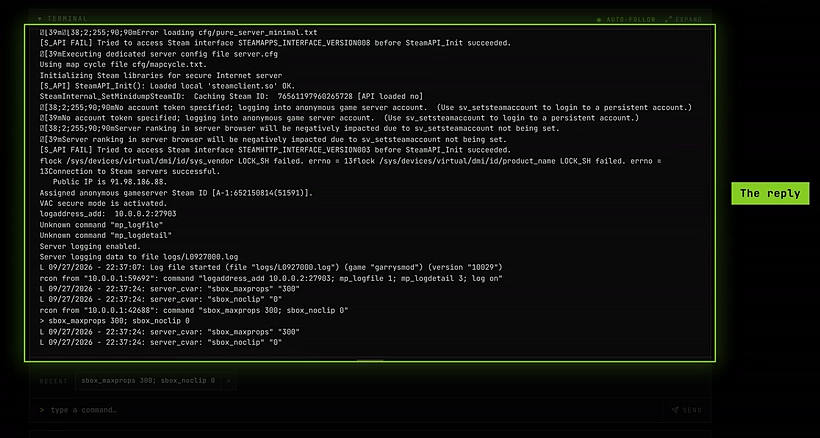
These are the Garry’s Mod server commands you’re most likely to want. Run them in the Console tab on the server page, or from Discord with /server console. You need the Control servers permission and a Live server. Commands reach Garry’s Mod over RCON, so the server’s reply appears right under your command.
A few things to know first:
- The console doesn’t suggest commands for Garry’s Mod as you type, so type the full command. Commands you run are kept as Recent shortcuts.
- Separate several commands with
;on one line:sbox_maxprops 300; sbox_noclip 0. - Settings you change in the console last until the server restarts. To keep them, put them in
server.cfg(see Make settings stick).
See The console for the tab itself.
Maps
| Command | What it does |
|---|---|
changelevel <map> | Change map, keeping players connected. |
map <map> | Load a map, reconnecting everyone. |
maps * | List every map the server has. |
Garry’s Mod comes with gm_construct (the default) and gm_flatgrass. Other maps have to be uploaded first, see Addons and gamemodes.
Gamemode
Your server starts in Sandbox. To play another gamemode that’s installed on the server, set it, then load a map:
gamemode terrortown
changelevel gm_construct
The new gamemode applies from that map load. Use gamemode sandbox and another changelevel to go back.
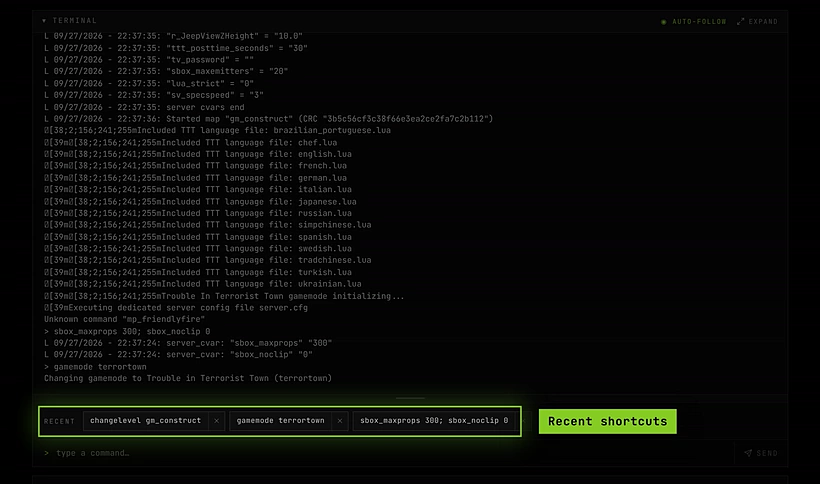
Garry’s Mod includes Trouble in Terrorist Town (terrortown) alongside Sandbox. TTT plays best on maps made for it (names starting with ttt_), which you upload yourself. Its weapons use Counter-Strike: Source content, so players without it may see missing models.
Sandbox limits and rules
The sbox_ settings control what players can do in Sandbox. The max ones are limits per player.
| Setting | What it limits or does |
|---|---|
sbox_maxprops <n> | Props each player can spawn. |
sbox_maxragdolls <n> | Ragdolls. |
sbox_maxnpcs <n> | NPCs. |
sbox_maxvehicles <n> | Vehicles. |
sbox_maxsents <n> | Scripted entities (items from the Entities tab). |
sbox_maxconstraints <n> | Welds, ropes and other constraints. |
sbox_maxballoons, sbox_maxthrusters, sbox_maxwheels, sbox_maxlamps, sbox_maxdynamite | The matching tool items. |
sbox_noclip <0/1> | 1 lets players fly through walls with noclip. |
sbox_godmode <0/1> | 1 makes every player invulnerable. |
sbox_playershurtplayers <0/1> | 0 turns off damage between players. |
sbox_weapons <0/1> | 0 spawns players without weapons. |
Lower limits help a SMALL server that lags under big builds.
Players, bots and bans
| Command | What it does |
|---|---|
status | List connected players with their user id and Steam ID. |
bot | Add a bot. In Sandbox, bots just stand there, which is handy for testing. |
kick <name> | Disconnect a player (or bot) by name. |
kickid <userid or steamid> | Disconnect by user id or Steam ID. |
banid <minutes> <userid or steamid> | Ban a player. 0 minutes means permanent. |
removeid <steamid> | Lift a ban. |
writeid | Save the ban list to garrysmod/cfg/banned_user.cfg. |
say <message> | Message everyone as the server. |
Run writeid after banning so the ban survives a restart. The ban lists are kept between runs.
Settings SLASHPLAY manages for you
These are set when the server starts. Don’t change them in the console or in server.cfg:
| Setting | Why |
|---|---|
sv_password | The join password. Use Join password on the General tab instead. If server.cfg sets it, it overrides the dashboard, and the copied connect line stops working. |
rcon_password | The Console tab uses it, and refuses to set it. Change it with Edit or Generate next to the RCON password on the General tab: the server switches to it at once. |
sv_hibernate_when_empty | Kept at 0 so the server stays awake when nobody’s on. |
Blocked commands
A few commands are refused because they would take the server down in a way the dashboard can’t follow:
| Command | Use instead |
|---|---|
quit, exit, shutdown, _restart | Restart on the General tab, or Stop |
host_timescale below 0.05 or above 10 | A value between 0.05 and 10 |
rcon_password | Edit or Generate next to the RCON password on the General tab |
Make settings stick
Console changes are gone after a restart. For settings you want every time, put them in garrysmod/cfg/server.cfg. It’s one of Garry’s Mod’s kept files, so it’s part of your save and comes back after every stop and restore.
Steps
-
On the server page, open Advanced → Files and go to
garrysmod/cfg. -
If there’s a
server.cfg, click Edit file on it. If there isn’t one, create a plain text file namedserver.cfgon your computer and Upload it. -
Add one command per line, for example:
hostname "Our build server" sbox_maxprops 300 sbox_noclip 1 sbox_playershurtplayers 0 -
Save, then click Restart on the General tab so Garry’s Mod reads it.
Leave sv_password and rcon_password out of it (see above). To play another gamemode, use the commands under Gamemode.