 /SLASHPLAY
Fund a team
Move tokens from your wallet into a team so its servers can run, use Fund & launch and Fund & restore, and take tokens back out if you own the team.
Read the transcript
This audio was created with Boson AI's Higgs Audio: boson.ai/higgs-audio
Servers run on their team’s tokens, never directly on yours. This page shows how to move tokens from your personal wallet into a team, how the one-click Fund & launch and Fund & restore windows do the same thing mid-deploy, and how a team’s owner takes tokens back out. It takes seconds and there is no fee: a token moved is a token received.
Wallet vs team balance
You deal with two balances on SLASHPLAY:
| Your wallet | A team balance | |
|---|---|---|
| Whose is it? | Yours alone | Shared by everyone on the team |
| Where do you see it? | The Wallet tab | The top of the team’s page on the Team tab |
| How does it fill up? | Buying tokens and redeeming codes | Members moving tokens in from their wallets |
| What spends it? | Nothing. It just holds tokens | Every server on the team while it runs, plus the team’s storage |
So the path is always the same: buy into your wallet, then fund a team. Your personal team gets 6 starter tokens when you sign up, so your first server needs no funding at all.
Before you start
- Tokens in your wallet. If it’s empty, buy some first. The smallest purchase is 100 tokens ($1).
- The DEPOSIT permission on the team, or be its owner. ADMIN includes it. See Roles and permissions.
Steps
- Open the Team tab and enter the team you want to fund.
- At the top, under Team balance, find Fund this team. It shows how much you have: 500 Tokens ($5.00) available in your wallet.
- Type an amount in whole tokens, or click Max to fill in your entire wallet.
- Click Deposit →.
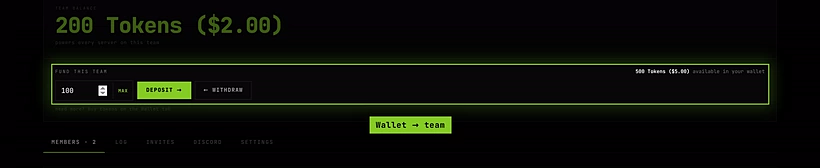
The team balance goes up and your wallet goes down by the same amount, instantly. Everyone on the team can now use those tokens to deploy and run servers.
Fund & launch and Fund & restore
You don’t have to visit the team page first. When you try to deploy on a team with no tokens, the deploy button reads Fund & Deploy, and clicking it opens Fund & launch. When you press Start on a server whose team can’t pay, Fund & restore opens instead. Both work the same way:
- The window names the team the server belongs to and how much it has left.
- If you have wallet tokens and may deposit, it shows Move tokens from your wallet into team … with an amount box, already filled with your whole wallet, and Max.
- Click Fund & Deploy → or Fund & Restore →. SLASHPLAY moves the tokens and launches the server in one go.
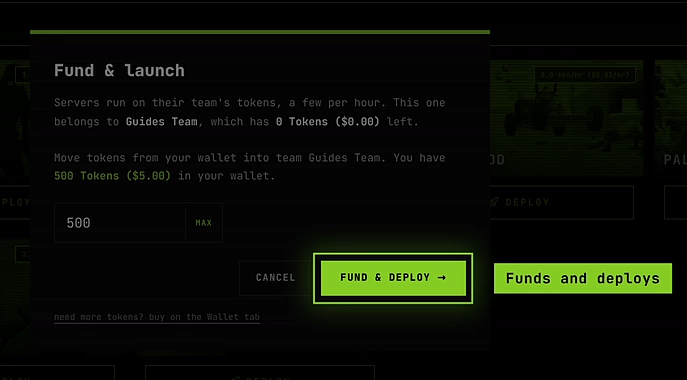
A server needs at least one hour of tokens on its team to start, at its own hourly price. For a small 3-token server that’s 3 tokens. Move at least that much.
The window adapts when it can’t fund the team:
- You can’t deposit into this team: it tells you how much is in your wallet, but you don’t have permission to deposit into that team, and to ask the team owner to top it up. Only Close is offered.
- Your wallet is empty: Your wallet is empty too., with Buy tokens → to go to the shop.
- Your wallet is empty but other teams you own have tokens: it lists those teams with their balances and an Open team → button each, so you can withdraw from one and come back.
Take tokens back out (owners only)
The owner of a team can move tokens from the team back into their own wallet:
- Open the team on the Team tab.
- Under Fund this team, type an amount.
- Click ← Withdraw.
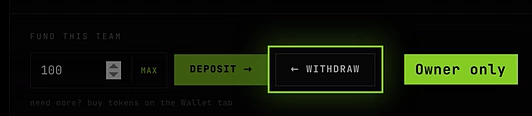
This is how you move tokens between teams you own: withdraw from one, then deposit into the other. Members, including admins, can’t withdraw. Tokens they deposit belong to the team from then on.
How it works
- Whole tokens only. Deposits and withdrawals move whole tokens. Decimals are rounded down.
- The team balance never goes below zero. When it runs out, SLASHPLAY saves and stops the team’s running servers. See Automatic stops.
- Tokens don’t expire, in your wallet or in a team.
- Everyone’s servers share one pool. A team balance isn’t split per member. Anyone who can start servers spends from the same balance, which is why only people you trust should have START on a team you fund. The team log shows what each server spent.
Troubleshooting
The team page says “You don’t have permission to deposit into this team.” You need the DEPOSIT permission. Ask the owner or an admin, or send them tokens another way: they can buy their own.
Deposit says “Not enough tokens in your wallet.” You typed more than your wallet holds. Click Max to use exactly what you have.
Withdraw says “Not enough tokens in the team.” or “Only the team owner can withdraw tokens.” You asked for more than the team holds, or you aren’t the owner. Only owners can withdraw.
I bought tokens but my server still can’t start. Purchases land in your wallet, not the team. Deposit them into the team the server belongs to.
Deploy says “Not enough tokens. You need at least … tokens (1 hour) to deploy.” The team has some tokens, but less than an hour’s worth for the size you picked. Deposit more, or pick a smaller size.