 /SLASHPLAY
Crashes and debug mode
What happens when your game crashes on SLASHPLAY: the server stays open for 30 minutes so you can fix it, who pays for that time, and how debug mode starts a server without its game.
When the game on your server crashes, the server itself keeps running. Its files and terminal stay open for 30 minutes, so you can fix what broke it, and then it stops by itself with a save. If the game crashes as soon as it starts, debug mode starts the server with all its files but without launching the game, so you can change whatever stops it.
When the game crashes
The server page shows The game crashed. The server is still open so you can fix it., and the status says Crashed. The box tells you:
- What happened. For example that the game stopped while starting, or ran out of memory.
- When it stops. Stops by itself in 29:41, with a save, so what you fix is kept. The clock counts down from 30 minutes.
- Whether you pay for this time. See Who pays for the 30 minutes.
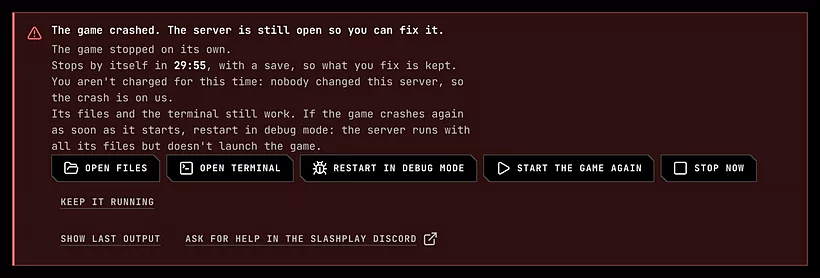
From the box you can:
- Open files or Open terminal to find and fix the problem. Show last output shows the last lines the game wrote, which usually name what went wrong.
- Restart in debug mode to keep the files open without the game. Use it when the game crashes again as soon as it starts.
- Start the game again once you’ve fixed it. The server keeps its address.
- Stop now to save and stop straight away.
- Keep it running to cancel the automatic stop, for when you need more than 30 minutes. From then on the time is billed like normal running time, until you stop it.
Players can’t join while the game is down. If you don’t do anything, the server saves and stops when the clock runs out, and the stop shows on the card as Stopped by itself: the game crashed, and it was stopped and saved 30 minutes later.
Who pays for the 30 minutes
It depends on whether anyone changed the server by hand:
| The server | The 30 minutes after a crash |
|---|---|
| Nobody changed its files, used its terminal or set launch options | Free. The crash is on us. |
| Someone did (see Changes on your own terms) | Billed like normal running time. |
| Either, after you click Keep it running | Billed from that click until you stop it. |
A boot that crashes before the server ever goes live is never billed, whatever happened before.
Debug mode
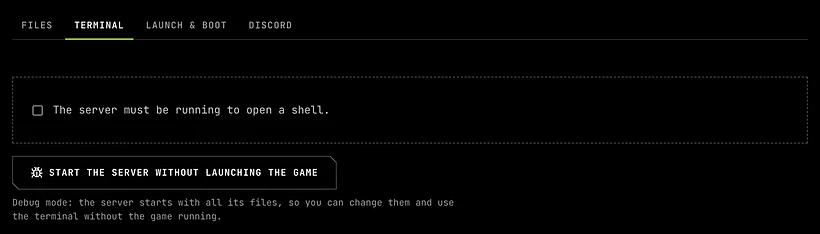
Debug mode starts your server with all its files in place, but doesn’t launch the game. Use it to fix a setting, a plugin or a file that makes the game crash on start, or to change files while nobody is playing.
Start a server in debug mode
- A stopped server: open Advanced → Terminal (or Advanced → Files) and click Start the server without launching the game.
- After a crash: click Restart in debug mode in the crash box.
While it runs
A yellow bar says Running in debug mode on every tab of the server page, and the server’s card shows Debug mode. There’s no address, because there’s no game to join. Files, the terminal and saves work as usual.

Debug mode is billed like normal running time.
Leave debug mode
- Start the game in the yellow bar launches the game on the same server, with the files as you left them.
- Stop saves and stops the server, like any stop.
Changes on your own terms
The first time anyone changes a server by hand, SLASHPLAY asks them to confirm that the changes are on their own terms. That happens on the first:
- file change in the file manager: saving, uploading, renaming, deleting, a new folder, extracting an archive or taking ownership of a file
- shell opened in the terminal
- launch option saved
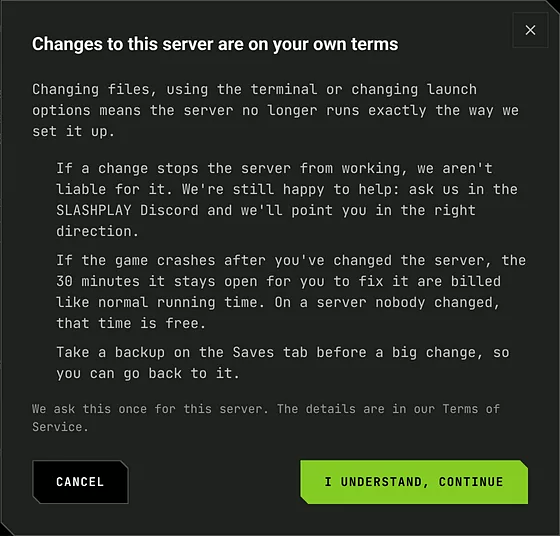
What you agree to:
- If a change stops the server from working, SLASHPLAY isn’t liable for it. We still help: ask us on Discord and we’ll point you in the right direction.
- If the game crashes after the server was changed, the 30 minutes it stays open are billed. See Who pays for the 30 minutes.
It’s asked once per server and remembered for all its future runs. Cancel leaves the server unchanged. Looking at files, downloading them and changing files in public/ don’t ask. The full text is in our Terms of Service.
Take a backup on the Saves tab before a big change, so you can go back to it. See Saves and backups.
Troubleshooting
The game crashes again every time I start it. Restart in debug mode, open Show last output on the crash box or the game’s log files, and undo the change it names. Then Start the game from the yellow bar.
The status says Crashed and there are no Files or Terminal buttons. Then the whole server went down, not just the game, so there’s nothing left open. Start it again from the card. You were only charged for the time it was online.
I need more than 30 minutes to fix it. Click Keep it running. It’s billed from then on, and it runs until you stop it.