 /SLASHPLAY
Change your Palworld world settings
Tune your Palworld server: experience and capture rates, day length, death penalty, PvP and more, by editing PalWorldSettings.ini with the file manager.
Read the transcript
This audio was created with Boson AI's Higgs Audio: boson.ai/higgs-audio
Palworld keeps its world rules in one file, PalWorldSettings.ini: how fast you level up, how easy Pals are to catch, how long days last, what you lose when you die, and a few dozen more. On SLASHPLAY you edit that file with the file manager, then restart the server. This page shows you how, and lists the settings people change most.
Before you start
- The server must be Live: the file manager only opens files on a running server. See The file manager.
- You need the Control servers permission on the team.
How the file works
Two files matter:
| File | What it is |
|---|---|
DefaultPalWorldSettings.ini (in the server’s top folder) | A sample with every setting at its default. Palworld never reads it. |
Pal/Saved/Config/LinuxServer/PalWorldSettings.ini | The file Palworld actually reads when it starts. On a new server it’s empty, which means “use the defaults”. |
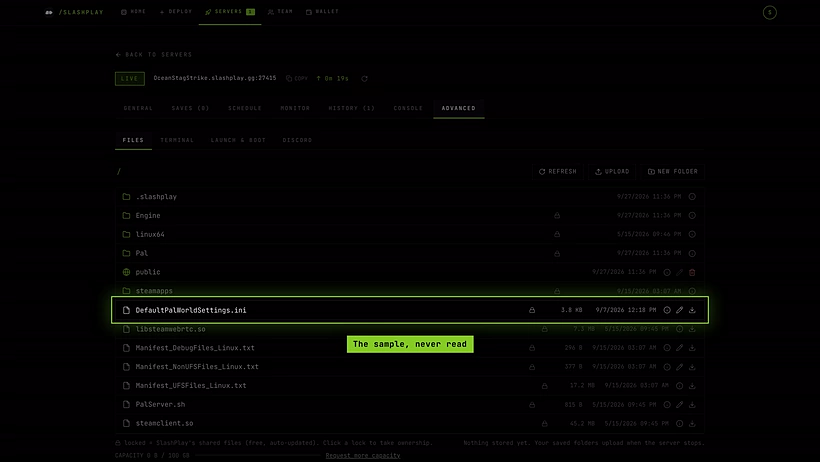
So you copy the sample into the real file, then change the values you care about. The Pal/Saved/Config/LinuxServer folder is part of every save, so your settings survive stopping and restoring. See What’s kept between runs.
Steps
-
On the server page, open Advanced → Files.
-
Open
DefaultPalWorldSettings.iniand copy everything from the line[/Script/Pal.PalGameWorldSettings]down to the end. -
Go to
Pal/Saved/Config/LinuxServerand openPalWorldSettings.ini.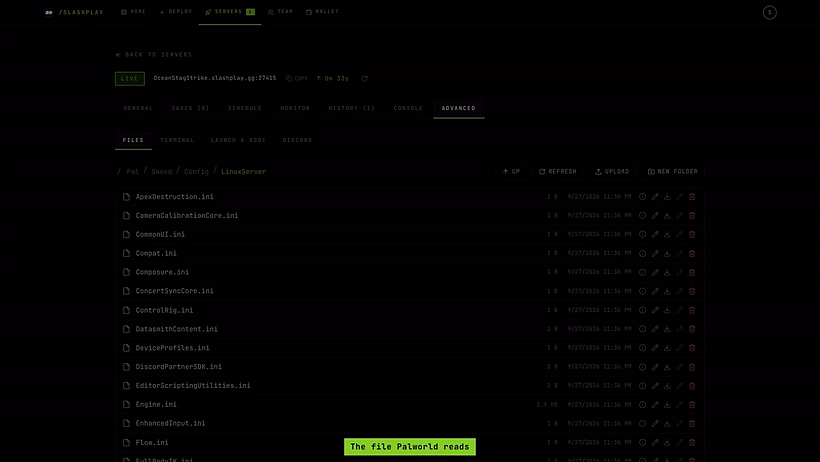
The file Palworld reads -
Paste what you copied, replacing whatever is there.
-
Change the values you want (see the table below). Everything sits on one long line starting with
OptionSettings=(: keep the commas between settings and the closing)at the end.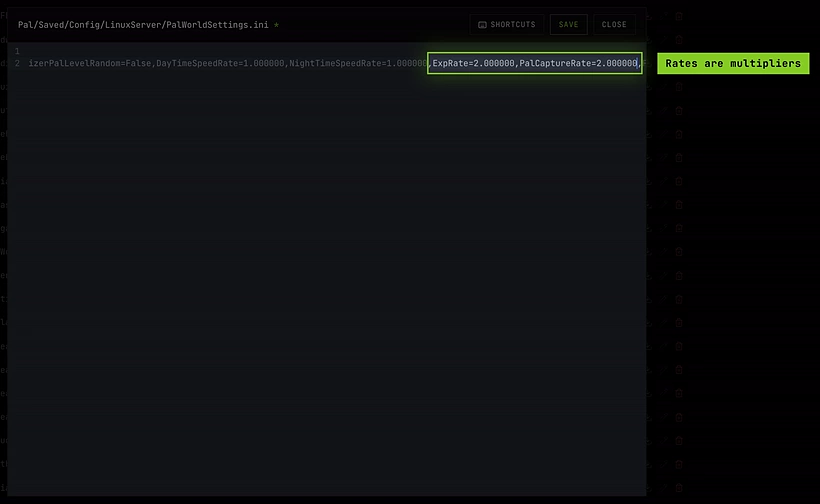
ExpRate and PalCaptureRate doubled, on the one long OptionSettings line -
Save the file.
-
On the General tab, click Restart. Palworld reads the file as it starts.
Settings worth knowing
Rates are multipliers: 1.000000 is normal, 2.000000 doubles it, 0.500000 halves it.
| Setting | Default | What it changes |
|---|---|---|
ExpRate | 1.000000 | Experience you earn |
PalCaptureRate | 1.000000 | How easy Pals are to catch |
PalSpawnNumRate | 1.000000 | How many Pals spawn (higher costs server performance) |
DayTimeSpeedRate / NightTimeSpeedRate | 1.000000 | How fast day and night pass |
WorkSpeedRate | 1.000000 | How fast Pals work at your base |
PalEggDefaultHatchingTime | 1.000000 | Hours an egg takes to hatch |
CollectionDropRate | 1.000000 | Materials from trees, rocks and ore |
EnemyDropItemRate | 1.000000 | Items dropped by defeated enemies |
PlayerDamageRateAttack / PlayerDamageRateDefense | 1.000000 | Damage players deal and take |
DeathPenalty | Item | What you drop on death: None, Item, ItemAndEquipment or All |
bEnablePlayerToPlayerDamage | False | Players can hurt each other |
bIsPvP | False | PvP rules for the world |
bEnableInvaderEnemy | True | Raids on your bases |
bEnableFastTravel | True | Fast travel between points |
BaseCampWorkerMaxNum | 15 | Pals that can work at one base |
GuildPlayerMaxNum | 20 | Players per guild |
AutoSaveSpan | 30.000000 | Minutes between automatic world saves |
Keep the exact spelling, including Palworld’s own quirks like Decreace. A setting Palworld doesn’t recognise is ignored.
Settings SLASHPLAY sets for you
A few values come from the server’s start command, and those win over the file:
- Server name: the server always shows as SlashPlay Palworld.
- Max players: 32.
- Join password: set it on the server page instead. See Join passwords.
- Admin password: it’s the server’s RCON password, shown on the General tab. See Admin commands.
- Port: set by SLASHPLAY, and part of your address.
Changing ServerName, ServerPassword, AdminPassword, ServerPlayerMaxNum or the ports in the file has no effect.
Troubleshooting
My changes did nothing.
Check that you edited Pal/Saved/Config/LinuxServer/PalWorldSettings.ini, not the sample in the top folder, and that you restarted afterwards. If the line is damaged (a missing comma or bracket), Palworld falls back to the defaults: paste a fresh copy of the sample and change one value at a time.
The file is empty. That’s normal on a new server: an empty file means “use the defaults”. Follow the steps above to fill it.
The server got slow after my change.
High PalSpawnNumRate, DropItemMaxNum or BaseCampWorkerMaxNum values cost performance. Lower them, or pick a bigger size while the server is stopped. See Server sizes.