 /SLASHPLAY
CS2 launch options
Add your own flags to the CS2 start command: boot into Competitive or Deathmatch every time, set the player count, and understand when launch args take effect.
Read the transcript
This audio was created with Boson AI's Higgs Audio: boson.ai/higgs-audio
Launch options (Launch args in the dashboard) are extra flags added to the command that starts CS2. They’re read once, when the server boots. Use them for things that should be true every time the server starts, above all the game mode and the number of player slots.
For changes during a session, you don’t need them: Quick actions and the console change things live. The catch is that live changes are gone after a restart. Launch options are how you make them permanent.
Before you start
- You need the Control servers permission on the team.
- Plan a stop and restore after saving. The panel says launch args apply at the next deploy (stop, then start), and that Restart on its own keeps the current command.
For the general version of this page, see Launch options.
Steps
-
Open your server’s page and go to Advanced → Launch & boot.
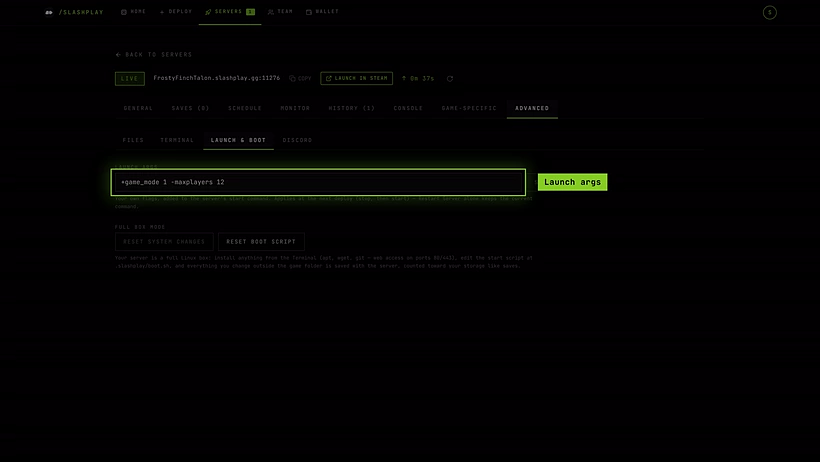
Launch args, under Advanced → Launch & boot. -
In Launch args, type your flags. The placeholder shows the idea:
+game_mode 1 -maxplayers 12.
Competitive with 12 slots, ready to save. -
Click Save.
-
Click Stop, wait for the server to stop, then Start it from the Servers list.
-
When it’s Live, check the result, for example with
game_modein the console, which prints the current value.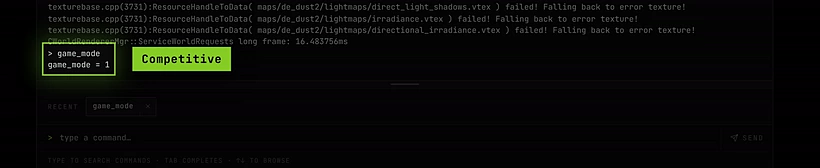
After a stop and restore, game_mode = 1: the server booted in Competitive.
To remove your flags, clear the field, click Save, and stop and restore again.
How flags work
- A
+flag runs a console command at boot:+game_mode 1is the same as typinggame_mode 1in the console. - A
-flag is a startup parameter of the program itself, such as-maxplayers 12. - Separate flags with spaces. Your flags are added after SLASHPLAY’s own ones, which already include
+map de_dust2.
Useful examples
Boot in Competitive:
+game_type 0 +game_mode 1Boot in Deathmatch with 16 slots:
+game_type 1 +game_mode 2 -maxplayers 16Boot in Wingman:
+game_type 0 +game_mode 2Mode numbers
These are the same values the mode pickers in Quick actions and Maps use:
| Mode | game_type | game_mode | Extra |
|---|---|---|---|
| Casual | 0 | 0 | |
| Competitive | 0 | 1 | |
| Competitive (Short) | 0 | 1 | +sv_game_mode_flags 32 |
| Wingman (2v2) | 0 | 2 | |
| Arms Race | 1 | 0 | |
| Deathmatch | 1 | 2 | |
| Deathmatch (Team vs Team) | 1 | 2 | +sv_game_mode_flags 4 |
| Deathmatch (Free For All) | 1 | 2 | +sv_game_mode_flags 32 |
| Guardian | 4 | 0 | |
| Co-op Strike | 4 | 1 |
Launch options and the game mode
The mode pickers in Quick actions and Maps switch mode on the running server, but the choice isn’t saved. After a Restart, a stop or a restore, CS2 boots into whatever the start command says, which is Casual unless you set something here.
So the usual pattern is:
- Playing one mode most of the time? Put it in launch args, so every boot starts there.
- Trying a mode for one session? Use Quick actions, and don’t worry about it.
A mode from launch args applies at boot; you can still switch to anything else during the session with Quick actions.
The map works differently: SLASHPLAY remembers the last map you loaded and boots back onto it after a restore, so you don’t need +map for that.
What you can’t set
To protect things the platform depends on, launch args:
- Can be at most 400 characters.
- May only use letters, digits, spaces and
+ - _ . / : = ,. No quotes,;,$or other shell characters. - Can’t include
-port,+rcon_password,+sv_passwordor+sv_hibernate_when_empty. These are managed by SLASHPLAY: the port is assigned, the passwords come from the dashboard, and hibernation stays off so the server is always ready.
If a flag breaks one of these rules, Save shows why and nothing is stored.

Troubleshooting
I saved launch args but nothing changed. They apply at boot. Stop the server and restore it. A plain Restart isn’t guaranteed to pick them up.
Saving fails with a message about characters.
Remove quotes, semicolons and anything outside the allowed set. For a hostname with spaces, set it in a .cfg file instead (see Console commands).
”… is managed by the platform and can’t be overridden.” You used one of the protected flags. Set the join password on the General tab; the rest isn’t changeable.
The server crashes at boot after adding flags. A bad flag can stop CS2 from starting. You’re not charged for a boot that fails, and the server stays open so you can fix it: clear Launch args, save, and click Start the game again on the crash box. The 30 minutes it stays open are billed, because launch args count as changing the server; click Stop now if you don’t need them. See Troubleshooting.