 /SLASHPLAY
How tokens work
Tokens cost one cent each. See what each server size burns per hour, when billing starts and stops, how storage is charged, and what an evening or month costs.
Read the transcript
This audio was created with Boson AI's Higgs Audio: boson.ai/higgs-audio
Everything on SLASHPLAY is paid for in tokens, and one token is one cent ($0.01). This page explains how many tokens a server uses, exactly when you are and aren’t being charged, and what real sessions cost, with worked examples. If you only remember one thing: a server costs tokens only while it’s live, and a small one costs 3 tokens ($0.03) an hour.
What a server costs per hour
The size you pick sets the price, and each size costs the same in every game: CS2, Counter-Strike: Source, Minecraft, Team Fortress 2, Garry’s Mod, Counter-Strike 1.6, Valheim and Palworld alike.
| Size | CPU | Memory | Tokens per hour | Dollars per hour |
|---|---|---|---|---|
| SMALL | 1 | 2 GB | 3 | $0.03 |
| MEDIUM | 2 | 4 GB | 6 | $0.06 |
| LARGE | 4 | 8 GB | 12 | $0.12 |
| XLARGE | 8 | 16 GB | 24 | $0.24 |
Memory drives most of the price, so doubling the size roughly doubles the cost.
Some games need a bigger size to run well. A game’s card on the Deploy tab shows the price of the size it’s set up for. Palworld is set up for LARGE (4 CPU, 8 GB), so its card shows 12 tokens an hour ($0.12). Valheim is set up for MEDIUM (2 CPU, 4 GB), so its card shows 6 tokens an hour ($0.06). The smaller sizes cost the same as in any other game, but they give these games less memory than they expect. If a server runs out of memory, it crashes and tells you so.
The deploy window always shows the exact hourly cost of the size you pick, on the button itself: Deploy · 3/HR. See Server sizes.
When you’re charged
Only while the server is live. Billing covers the time your server is up and playable, and the time it runs in debug mode. While it’s Stopped, it costs nothing per hour.
Failed boots are free. If a server crashes while it’s starting, that attempt is never charged. After any crash the server stays open for 30 minutes so you can fix it: free if nobody changed the server by hand, billed if someone did. See Who pays for the 30 minutes. When a boot succeeds, billing covers the time from the moment you clicked Deploy or Restore, which is usually under a minute.
To the second, not the hour. A 20-minute session on a 3-token server costs exactly 1 token, not a full hour’s 3. Behind the scenes, SLASHPLAY checks every running server every 30 seconds and takes whole tokens from the team balance as they are used up. When the server stops, whatever fraction of a token is left over is settled exactly. That’s why balances sometimes show decimals, like 41.3 Tokens.
From the team, not from you. Servers spend their team’s balance, never your personal wallet. See Fund a team.
Starting needs an hour in hand. To deploy or restore a server, its team must hold at least one hour’s worth of tokens at that server’s price: 3 tokens for a small server. It doesn’t reserve them; it just makes sure the server won’t stop again minutes later.
At zero, the server saves and stops. A team balance never goes negative. When it hits zero, SLASHPLAY saves each running server and stops it. See Automatic stops.
Storage
Saved worlds and files cost 1 token per GB per month, charged continuously from the team balance, whether the server is running or not. Most saves are tiny: a plain CS2 server saves a few kilobytes, which costs a tiny fraction of a token a month. Big Minecraft worlds and servers full of custom maps are where it adds up. See Storage costs.
Tokens never expire
Tokens in your wallet or in a team stay there until they’re spent. There’s no subscription, no monthly fee and no minimum spend.
Worked examples
All of these use a small server at 3 tokens an hour.
Your starter tokens. New accounts get 6 tokens on their personal team: two hours of play, free.
An evening with friends. You play for 3 hours and stop the server: 3 hours × 3 tokens = 9 tokens, or $0.09.
A quick match. You play for 40 minutes: 40/60 × 3 = 2 tokens, or $0.02.
A bigger server for a full lobby. Same 3-hour evening on LARGE: 3 hours × 12 tokens = 36 tokens, or $0.36.
Always on for a month. A small server that never stops, for 30 days: 24 hours × 30 days × 3 tokens = 2,160 tokens, or $21.60.
What $5 buys. 500 tokens is about 166 hours on a small server, or about 41 hours on a large one.
Where to see your spending
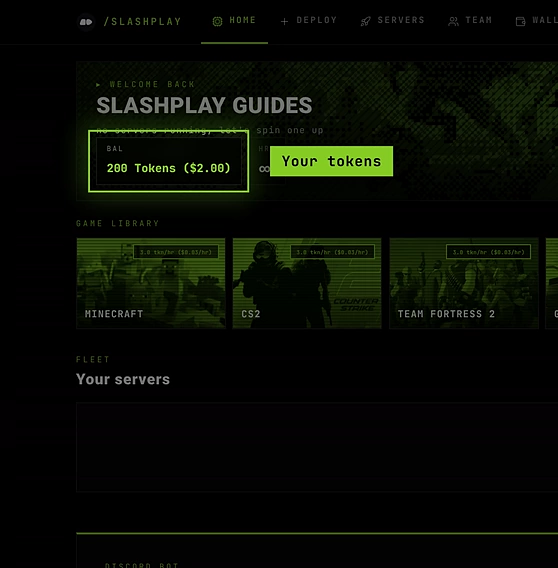
- Home tab: BAL adds up the balances of all your teams, and HRS shows roughly how many hours they’d last at your current burn rate.
- Servers tab: each running server shows its hourly rate and how many tokens it has spent this run.
- A server’s History tab: every past run with its duration and cost. See Monitor and history.
- The team log: every server the team has ever run and what it cost. See The team log.
Troubleshooting
My balance went down while all my servers were stopped. That’s storage for your saves, charged continuously. It’s usually a fraction of a token. See Storage costs.
My balance has decimals. Short sessions and storage are billed exactly, in fractions of a token.
My server crashed on start. Was I charged? Not for the boot. A boot that never became live costs nothing, and the team log marks it failed to boot · not billed. The 30 minutes the server then stays open are free too, unless someone changed the server by hand. See Crashes and debug mode.