 /SLASHPLAY
The team log
See every server your team has run, how long each session lasted, who started it and what it cost, including servers that have since been deleted.
Read the transcript
This audio was created with Boson AI's Higgs Audio: boson.ai/higgs-audio
The team log answers one question: where did our tokens go? It lists every server the team has ever run, with how many sessions it had, how long it was up and what it spent, and lets you open any server to see each session and who started it. Deleted servers stay in it. Every member can read it, including VIEW ONLY members.
Open the log
- Open the Team tab and enter the team.
- Click Log.
What you see
The totals
Four numbers across the top, covering every server on the team, deleted ones included:
| Total | What it counts |
|---|---|
| Servers | Servers the team has run |
| Sessions | Runs, from a start to a stop, across all of them |
| Time played | How long they were up, added together |
| Spent | Tokens those runs cost, with the dollar amount |

One row per server
| Column | What it shows |
|---|---|
| Server | The server’s name, or its game if it was never renamed. Live if it’s running now, Deleted if it has been deleted (hover to see when, and by whom). |
| Game | Which game it runs. |
| Sessions | How many times it has been started. |
| Played | Total time up, like 14h 05m. |
| Spent | Total tokens and dollars. Hover to see the exact figure. |
| Last active | The day it last ran, or now if it’s live. |
A “server” here is the same server across every stop and restore. Its address changes with each run, but it’s one row.
The list shows 25 servers at a time. Use Prev and Next at the bottom for more.

Every session
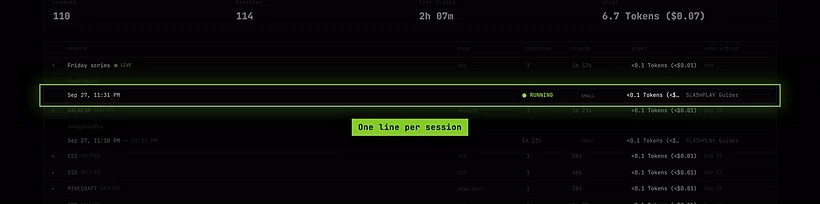
Click a server’s row (the ▸ at the start) to open its sessions, newest first. Each line shows:
- When it started, and the time it stopped.
- How long it ran, or Live if it’s up right now.
- Which size it ran at, like SMALL or LARGE.
- What it cost, in tokens and dollars.
- Who started it: a member’s name, a Discord name followed by (Discord), or removed account if that person has since deleted their account.
Servers with many sessions load 50 at a time; click Show more to see older ones.
How it works
How spend is worked out. A session’s cost is its run time multiplied by the server’s hourly rate, which is exactly what was taken from the team balance. Short sessions cost a fraction of a token and are shown with one decimal, for example 0.8 Tokens; hover to see the exact amount. See How tokens work.
Failed boots. A session that crashed while starting shows failed to boot · not billed and cost nothing.
Sessions started from Discord. When someone in a connected Discord server starts a server with /server start without a SLASHPLAY account, the log credits them by their Discord name, like Sam (Discord). A member with a linked account shows under their SLASHPLAY name. See Bot commands.
Deleted servers. Deleting a server removes its saves and files, but not its record. It stays in the log, marked Deleted, with every session and every token it spent. Servers deleted before the log started keeping records are listed as missing in a note at the bottom of the page.
What the log doesn’t include. Storage charges for saves aren’t in the log, since they aren’t tied to a session. See Storage costs. The log also never records console commands, chat or player names: it’s about spending, nothing else.
Staying current. While a server is live, the log refreshes itself every minute so its time and spend keep climbing.
Troubleshooting
A session says “not recorded” instead of a duration. The session ended but its stop time was never saved, usually after an outage. It’s left out of the totals rather than guessed, and the server’s row says how many sessions were excluded.
The Spent total doesn’t match what left our balance. The log only counts running time. Storage is charged separately, continuously, from the same balance. Check the Saves tab of your servers for Storage used.
I can’t find a server I deleted a long time ago. Servers deleted before the log began keeping records can’t be recovered. The note at the bottom of the log gives the date.