 /SLASHPLAY
Mods, plugins and custom gamemodes
What you can add to each game on SLASHPLAY today: SourceMod plugins, Paper plugins, admin mods by hand, Workshop maps, and where mods aren't supported.
Read the transcript
This audio was created with Boson AI's Higgs Audio: boson.ai/higgs-audio
Every game on SLASHPLAY starts as the plain, unmodded game. How far you can take it from there depends on the game: some have one-click plugins, some take add-ons you upload yourself, and some have no mod support at all. This page gives you the honest picture per game, and points to the detailed guides.
At a glance
| Game | What you can add | How |
|---|---|---|
| Counter-Strike: Source | SourceMod plugins, your own mods | Mods tab, Game-specific → Plugins, or the file manager |
| Minecraft: Paper | Bukkit, Spigot and Paper plugins | Upload .jar files with the file manager |
| Minecraft: Vanilla | Nothing | Plugins need Paper |
| CS2 | Workshop maps, game modes, configs | Game-specific tab, launch args, the file manager |
| Team Fortress 2 | Admin mods like SourceMod, maps | By hand with the file manager |
| Garry’s Mod | Addons like ULX, Lua | By hand with the file manager |
| Counter-Strike 1.6 | Admin mods like AMX Mod X, maps | By hand with the file manager |
| Palworld, Valheim | Settings only | Edit their config files |
Adding or changing anything needs the Control servers permission. See Roles and permissions.
Counter-Strike: Source
The best-supported game for mods. Every server comes with MetaMod:Source and SourceMod 1.13 installed, so SourceMod plugins work without setup. You get three ways to add them:
- Game-specific → Plugins: curated plugins we’ve tested, one click to install. Today that’s CSS:DM, the deathmatch plugin.
- The Mods tab: popular plugins, plus your team’s own library. Upload a mod once, then install it on any of your team’s CS:Source servers.
- The file manager, for full control.
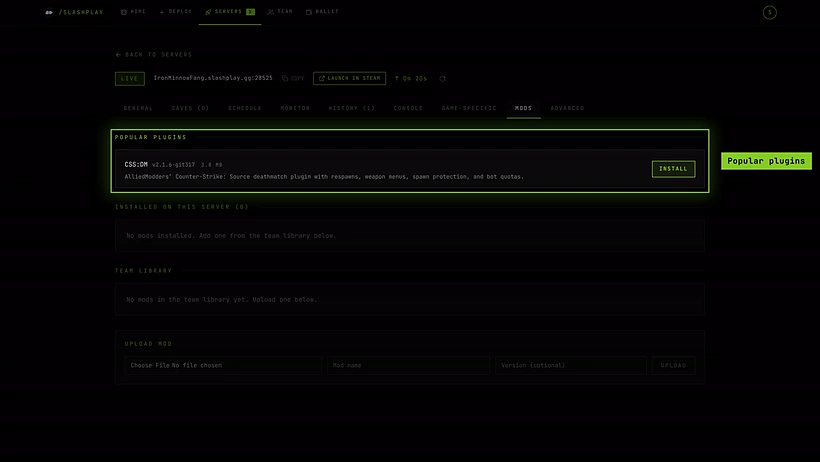
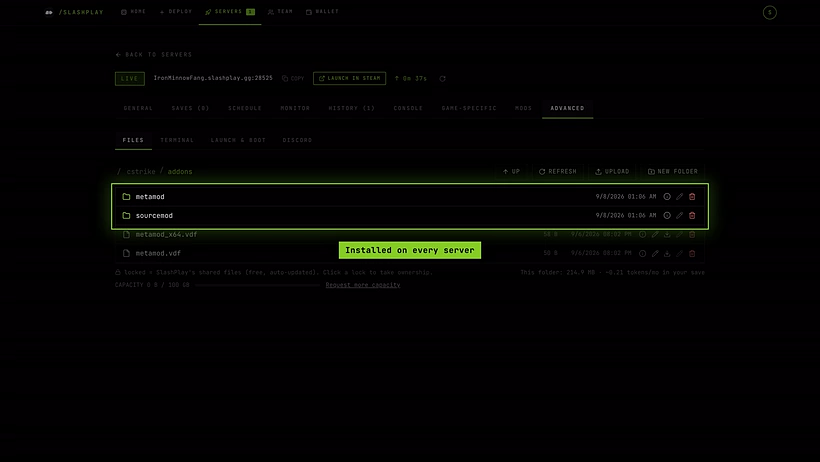
Game-specific → Modes also switches between Deathmatch, Surf, Gun Game and Zombie presets. See Counter-Strike: Source plugins and mods and Modes.
Minecraft
Paper (both Paper (latest) and Paper 1.21) runs Bukkit, Spigot and Paper plugins. There’s no Mods tab or one-click installer: download the plugin’s .jar, upload it to the plugins folder in Advanced → Files, and click Restart. The whole plugins folder is kept with your save. See Install Paper plugins.
Vanilla is the untouched Mojang server and doesn’t load plugins. There’s no support for Forge or Fabric mods or modpacks. If you want plugins, deploy a Paper server: see Paper or Vanilla?.
CS2
SLASHPLAY doesn’t offer mod support for CS2 today: there’s no Mods tab, and Metamod and CounterStrikeSharp aren’t available. Most custom setups don’t need them, though:
- Game modes: Competitive, Wingman, Arms Race, Deathmatch and more, switched from the Game-specific tab. See Game modes and maps.
- Workshop maps: paste a Steam Workshop link and play it. See Workshop maps.
- Configs: your own
.cfgfiles ingame/csgo/cfg, which is kept with your save. - Launch args: boot straight into a mode or set the player count. See CS2 launch options.
Things that usually need a plugin elsewhere, like admin access from in-game chat or an approval queue, are built in: see RCON and the admission queue.
Team Fortress 2, Garry’s Mod and Counter-Strike 1.6
These games have no Mods tab or plugin list, but their addons folder is kept between runs. That means you can install admin mods and other add-ons yourself: upload them with the file manager, then Restart.

- Team Fortress 2: SourceMod with MetaMod:Source. See SourceMod on TF2.
- Garry’s Mod: ULX and other addons, plus your own Lua. See ULX on Garry’s Mod.
- Counter-Strike 1.6: AMX Mod X with Metamod. See AMX Mod X on CS 1.6.
You’re on your own with third-party add-ons: we don’t review or support them, and a broken one can stop the server from starting. Some admin mods also need a change to a game file outside the kept folders; take ownership of that file in the file manager first, or your change is lost at the next stop. For Garry’s Mod, add-ons that bring models, materials or maps must also be on each player’s game.
Palworld and Valheim
There’s no mod support for Palworld or Valheim. You can change their settings through their config files, which are kept with your save: Palworld’s server settings folder, and Valheim’s admin, ban and permitted lists. See the Palworld and Valheim pages.
Custom gamemodes
There’s no general “custom gamemode” installer. What you can do today:
- CS2: every official mode, plus Workshop maps built for a mode.
- Counter-Strike: Source: the mode presets and SourceMod plugins.
- Garry’s Mod, TF2, CS 1.6: whatever you can install yourself into the kept folders.
- Minecraft: plugins on Paper.
Launch args, for starting a server a particular way, exist only for CS2 and Minecraft. For other games, the boot script can change how the game starts. See Launch options.
Before you add anything
- Know what’s kept. Only certain folders survive a stop. Put mods there, or take ownership of the folder first. See What’s kept between runs.
- Take a backup. Saves → Take backup now before a big change gives you a way back. See Saves and backups.
- Mind the storage. Everything you add is saved with the server at 1 token per GB per month. See Storage costs.
- Game updates can break mods. Games update automatically, and an add-on built for the old version may stop working. See Game updates.