 /SLASHPLAY
What is SLASHPLAY?
SLASHPLAY runs game servers on demand: pick a game, deploy in a minute, pay a few cents per hour while it's live, and save and stop it when you're done.
Read the transcript
This audio was created with Boson AI's Higgs Audio: boson.ai/higgs-audio
SLASHPLAY is game server hosting that you pay for by the hour, only while you play. You pick a game in your browser, click Deploy, and about a minute later there’s a server running on our machines with its own address. Your friends join it like any other server. When the evening is over you click Stop, the server is saved and switched off, and it stops costing anything. Next time, you bring it back exactly as you left it.
There are no subscriptions, no monthly plans and nothing to install. This page explains how it all fits together.
How it works, end to end
Tokens pay for everything
SLASHPLAY runs on tokens. One token is one cent ($0.01). A small server costs 3 tokens an hour, so an evening of play costs a few cents. You buy tokens in your wallet (the smallest purchase is 100 tokens, $1), and they never expire. See How tokens work.
Servers belong to a team
Every server belongs to a team, and runs on that team’s token balance. When you sign up you get your own personal team with 6 free tokens, enough for about two hours on a small server. If you play with a regular group, you can create a shared team, invite your friends, and all chip in to the same balance. Each member gets a role that decides what they can do. See Teams.
Tokens move in one direction: you buy them into your personal wallet, then deposit them into a team. Servers only ever spend the team’s balance. See Fund a team.
Deploy
On the Deploy tab you pick a game, a region and a size, then click Deploy. SLASHPLAY finds a machine, starts the game in its own isolated container with the latest game files, and gives it a random, readable name like GrandOspreyFeather.slashplay.gg. Most servers are live within a minute. See Deploy a server.
Live
When the status turns Live, the server has an address and an Invite page. Open it to send your friends in: it opens a page that launches the game and joins your server in one click, and they don’t need a SLASHPLAY account. While a server is live, it spends tokens from its team’s balance, charged every 30 seconds. See Connecting and inviting.

Stop
When you’re done, click Stop. SLASHPLAY saves the server’s files (your world, your settings, your maps), shuts it down and releases the address. From that moment the hourly cost stops. The saved files cost a little storage, see below.

A server also saves and stops on its own if its team runs out of tokens, if it reaches a maximum run time you set, or when a schedule window closes. See Automatic stops.
Start
A stopped server stays in your list. Click Start and it comes back with the same size, the same settings and the files from its newest save, usually within a minute. It gets a fresh address and invite link each time, so share the new one. See Start, stop and restore.
What you don’t have to do
If you’ve ever hosted a game server yourself, here’s what SLASHPLAY takes off your hands:
- No port forwarding. The server never runs on your network, so there’s no router to configure and no firewall to open.
- No installs. The game server software, its dependencies and the machine it runs on are all ours.
- No updates. When a game gets patched, SLASHPLAY updates its server files for you. While that happens the game’s card shows Updating…; when it’s done, usually within minutes (big games like CS2 can take 15 minutes or more), you can deploy again on the new version. See Game updates.
- No leaving a PC on. The server runs whether your computer is on or off, and stops when you tell it to.
- No config files to start. Every game starts with sensible defaults. You can still change everything later, through quick actions, the console, a file manager and a terminal, when you want to.
Which games?
Today you can run:
| Game | Notes |
|---|---|
| Counter-Strike 2 | Quick actions for modes, maps, bots and match flow; Workshop maps; admission queue |
| Minecraft (Java Edition) | Paper or Vanilla; plugins; whitelist |
| Counter-Strike: Source | Quick actions, game modes, SourceMod plugins and mods |
| Counter-Strike 1.6 | Classic de_dust2 out of the box |
| Team Fortress 2 | Starts on cp_dustbowl, 24 slots |
| Garry’s Mod | Sandbox on gm_construct |
| Valheim | Always uses a join password |
| Palworld | Up to 32 players |
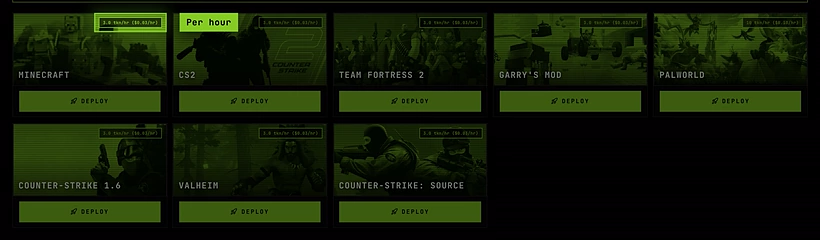
See all of them on the Games page. The Deploy tab always shows the current list.
Where do servers run?
Every server runs in EU - Germany today. That gives good ping across most of Europe. Other regions (US, Asia, South America and many more European cities) are listed in the deploy window as coming soon: picking one lets you vote for it, and the votes decide where SLASHPLAY opens next. See Regions.
What does it cost?
In plain numbers, the same for every game:
| Size | CPU | Memory | Per hour | A 4-hour evening |
|---|---|---|---|---|
| SMALL | 1 | 2 GB | 3 tokens ($0.03) | 12 tokens ($0.12) |
| MEDIUM | 2 | 4 GB | 6 tokens ($0.06) | 24 tokens ($0.24) |
| LARGE | 4 | 8 GB | 12 tokens ($0.12) | 48 tokens ($0.48) |
| XLARGE | 8 | 16 GB | 24 tokens ($0.24) | 96 tokens ($0.96) |
Some games need a bigger size to run well: Palworld is set up for LARGE, so its card shows 12 tokens an hour. Every game card on the Deploy tab shows its price per hour at the size it’s set up for, and the deploy button shows the exact price of the size you picked before you click it. See Server sizes.
A few more things worth knowing:
- $5 buys 500 tokens, which is about 166 hours on a small server.
- A boot that fails costs nothing. If a server crashes while starting, you’re not charged for it.
- A stopped server costs only storage: 1 token per GB per month for its saves. A plain CS2 save is a few kilobytes, so that rounds to nothing. See Storage costs.
- Your balance never goes negative. When a team runs out of tokens, its servers are saved and stopped, and nothing is charged beyond what you had.
The full price list is on the pricing page.