 /SLASHPLAY
Addons, maps and gamemodes on Garry's Mod
How custom content works on a SLASHPLAY Garry's Mod server: upload addons and maps with the file manager, restart, and get the content to your players.
Read the transcript
This audio was created with Boson AI's Higgs Audio: boson.ai/higgs-audio
Garry’s Mod is at its best with addons: new tools, weapons, entities, maps and whole gamemodes. On SLASHPLAY there’s no addon installer and no Workshop collection support yet, so you add content yourself with the file manager. This page explains how that works, what’s kept, and the part people often miss: your players need the content too.
How addons get onto the server
Addons live in garrysmod/addons. That folder is kept between runs, so whatever you put there comes back after every stop and restore.
-
Get the addon on your computer. It’s either a folder (with folders like
lua,modelsormaterialsinside) or a single.gmafile. -
On the server page, open Advanced → Files and go to
garrysmod/addons.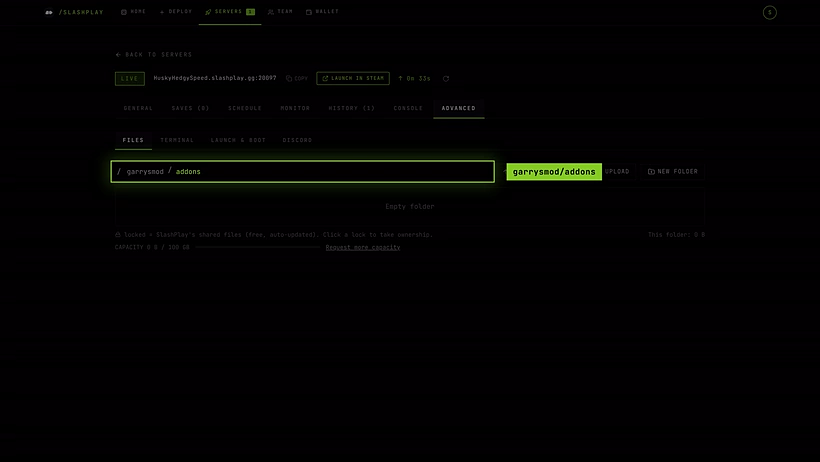
garrysmod/addons is kept between runs. -
Upload the folder or the
.gmafile. For many files, zip them first, upload the.zip, open its row’s More actions menu and click Extract here. Uploads can be up to 4 GB.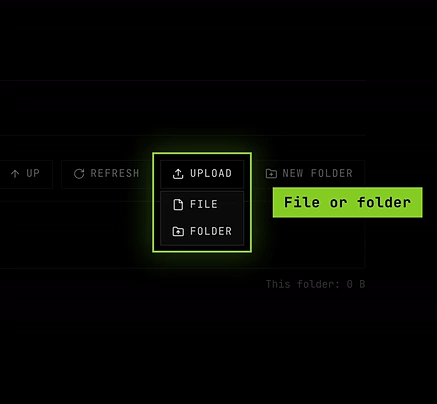
Upload takes a single file or a whole folder. 
Extract here unpacks a zip where it is. -
Click Restart on the General tab so Garry’s Mod loads the addon.

To remove an addon, delete it in the file manager and restart. See The file manager.
Maps
Upload a map’s .bsp to garrysmod/maps. It isn’t one of the kept folders, but new files you upload are part of your save automatically, so the map stays. Load it with changelevel <mapname> in the Console tab. Maps packed as an addon go into garrysmod/addons like any other addon.
Gamemodes
A gamemode is also content on the server: usually an addon, or a folder in garrysmod/gamemodes. Garry’s Mod includes Sandbox and Trouble in Terrorist Town. Once a gamemode is on the server, switch to it from the console:
gamemode terrortown
changelevel gm_construct
The server always starts in Sandbox, and Restart brings it back to Sandbox, because launch options aren’t available for Garry’s Mod. After a restart, run the two commands again. See Garry’s Mod console commands.
Your players need the content too
The server only runs the addon. Models, materials, sounds and maps also have to be on each player’s own game, or they see purple and black checkerboards, big red ERROR models, or can’t load the map.
Garry’s Mod servers usually handle this in one of two ways. Neither is set up for you on SLASHPLAY today:
- Workshop collections. Normally a server starts with a Workshop collection so it downloads the addons itself and tells players to download them too. That’s done with a start parameter (
+host_workshop_collection), and launch options aren’t available for Garry’s Mod, so this isn’t supported. - FastDL. A web server that players download files from while joining. SLASHPLAY doesn’t provide one for Garry’s Mod.
What works today:
- Everyone subscribes to the same Workshop items in Steam before joining. Simple for a group of friends.
- Lua that points players at the Workshop. Garry’s Mod’s own
resource.AddWorkshop("<workshop id>"), in a server-side Lua file undergarrysmod/lua/autorun/server, tells joining players’ games to download that Workshop item. The server still needs its own copy of the addon ingarrysmod/addons.garrysmod/luais kept between runs.
What’s kept
These are part of every save: garrysmod/addons, garrysmod/lua, garrysmod/data (where many addons store their settings), garrysmod/cfg/server.cfg and the ban lists. New files you upload elsewhere, like maps, are kept too. Everything you keep counts toward storage, at 1 token per GB per month, so delete addons you no longer use. See What’s kept between runs.
Troubleshooting
The addon doesn’t load.
Check it sits directly in garrysmod/addons (for a folder addon: garrysmod/addons/<name>/lua/..., not one folder deeper), and that you restarted. The Console tab shows Lua errors at startup.
Players see ERROR models or missing textures. The content isn’t on their game. See Your players need the content too.
The server crashes after I added something. The crash box shows the last output, which often names the addon. Delete it in the file manager and restart. Big addon packs may also need a bigger size.