 /SLASHPLAY
Link your SLASHPLAY account in Discord
Use /link account so the SLASHPLAY bot can act as you: reach your own servers from any Discord, check /balance, and use buttons like Restart. Unlink any time.
Read the transcript
This audio was created with Boson AI's Higgs Audio: boson.ai/higgs-audio
Linking tells the SLASHPLAY bot that your Discord account and your SLASHPLAY account are the same person, so it can act as you. You don’t always need to: in a Discord server connected to a team, your Discord roles may already let you use /server. This page explains when linking helps, walks through the link step by step, and shows how to check or undo it.
When you need it
You don’t need to link to use a team’s servers through your Discord roles. If a team admin has connected the Discord server and given your role access, /server list, start, stop and the rest work straight away, without any SLASHPLAY account. See Who can use it.
You do need to link to:
- Use your own teams’ servers from Discord, including in a DM with the bot or in a Discord server that isn’t connected to your team.
- See your team’s tokens with
/balance. - Click the Restart button on a crash notice, or Approve, Ban and Dismiss on CS2 join requests.
- Use the SLASHPLAY profile and Use as RCON command right-click actions.
Once linked, you act as your SLASHPLAY account, with your team permissions, plus whatever your Discord roles add in that Discord server. A coach who is VIEW ONLY on the club’s team but has a Discord role with console access gets both.
Before you start
-
A SLASHPLAY account that signs in with Discord, using the same Discord account you’re typing in. If you only sign in with Steam, first connect Discord under Account → Sign-in methods on the dashboard. See Sign-in methods. No account yet? The link flow creates one when you sign in with Discord.

Steam-only account? Connect Discord here first -
A browser where you can sign in to slashplay.gg.
Steps
- In any Discord server with the bot, or in a DM with it, type
/link accountand press Enter. - The bot replies privately with Link your SLASHPLAY account and a Link account button. The link works for 10 minutes. Click it.
- Your browser opens slashplay.gg. If you aren’t signed in, sign in with Discord first; you come straight back afterwards.
- The Authorize access page shows the two accounts side by side: your Discord account on the left, your SLASHPLAY account on the right. Check both are yours.
- Read what you’re granting (below), then click Approve access.
- The page says You’re all set. Close the tab and go back to Discord. The bot’s message has changed to Account linked, with Open dashboard and Bot guide buttons.
Try /whoami to confirm, or /server list to see your servers.
What you grant
The Authorize access page lists what the bot can do as you whenever your Discord account uses it:
- Read your servers and team
- Start, stop, and restart your servers
- Read your token balance
- Manage CS2 admission and bans
- Manage guild linking (if you’re a guild admin)
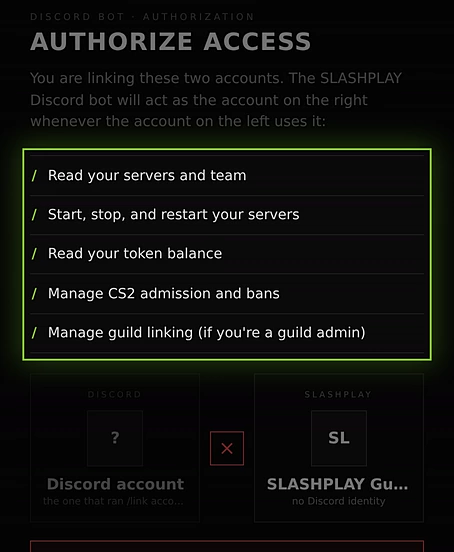
The bot only acts when you use a command or button, and only within your permissions on each team. It can’t buy tokens, move tokens between your wallet and a team, or change team members. /whoami shows the exact access under Account access.
If the two accounts don’t match
The page checks that the Discord account that ran /link account is the Discord account on the SLASHPLAY account you’re signed in with.
-
These are two different accounts. The browser is signed in as someone else, for example a shared computer. Click Switch SLASHPLAY account, sign in as yourself, and you come straight back.
-
This account has no Discord identity. You’re signed in to an account that was created with Steam only. Connect Discord to it first, or switch to the SLASHPLAY account you use with Discord.
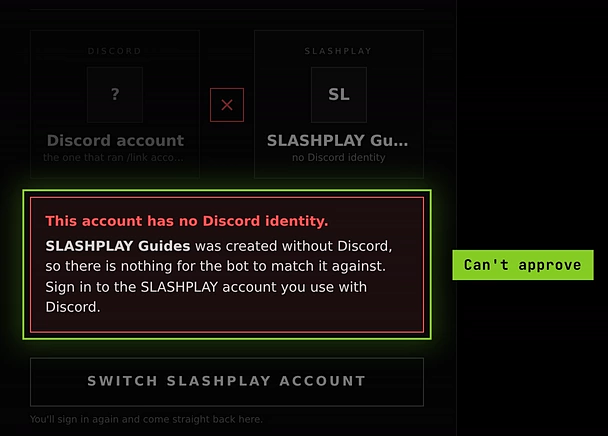
No Discord on this account: Approve access is replaced by Switch SLASHPLAY account
You can’t approve until they match. That stops anyone from making their Discord act as your account.
Check your link: /whoami
/whoami shows, privately:
- Account connected: You’re connected as your SLASHPLAY name.
- Account access: what you granted the bot.
- This Discord server: Connected to the team, or that it isn’t connected to a team, or that you’re in a DM.
Without a link, it tells you you haven’t linked an account, and that /server list may still work through your roles.
Check your tokens: /balance
With a linked account, /balance privately shows Team token balance: the tokens on the team you last opened on the dashboard’s Team tab. It has a Top up button, which opens your Stripe billing portal, and Open dashboard. Without a link it asks you to run /link account first.
Unlink: /link logout
Type /link logout. The bot replies Account disconnected: Your account is disconnected and the bot’s access has been revoked. From then on you only have what your Discord roles give you.
If it replies Disconnection needs one more step, SLASHPLAY couldn’t be reached to revoke the access. You’re already unlinked in Discord; run /link logout again to finish.
Running /link account again while linked just says Account already linked.
Troubleshooting
The Link account button says the link expired.
Links last 10 minutes. Run /link account again for a fresh one.
I linked, but /server list in our club’s Discord doesn’t show my own servers.
Inside a Discord server connected to a team, only that team’s servers can be used. Use your own servers from a DM with the bot, another Discord server, or the dashboard.
The bot says my account connection is missing or has expired.
Run /link account again.
/balance replies “This bot token is not authorized for this operation”.
Your link is fine. Check the team’s balance on the dashboard’s Team tab instead.
I linked the wrong SLASHPLAY account.
Run /link logout, sign in to slashplay.gg with the right account, and link again.