 /SLASHPLAY
Storage costs
Why a stopped server still costs a little: saves, owned files and Full Box changes are billed at 1 token per GB per month. How to check usage and cut it.
Read the transcript
This audio was created with Boson AI's Higgs Audio: boson.ai/higgs-audio
A stopped server costs nothing per hour, but its saved files still take up space, and space costs 1 token per GB per month. For most servers that’s a fraction of a cent. This page explains what counts as storage, how it’s charged, where to see how much you use, and how to bring it down when a big world or a pile of old saves starts to add up.
What counts as storage
Storage is everything SLASHPLAY keeps for your team’s servers between runs:
- Saves. Every saved version of every server on the team, whether the server is running or stopped. A save holds your world, configs and any files the server writes. Each save you keep counts on its own. See Saves and backups.
- Files you own. Game files SLASHPLAY provides, like the base game and its standard maps, are shared and free. When you upload your own files, or take ownership of a folder in the file manager, those files become part of your save and count as storage. See The file manager.
- Full Box system changes. Anything you install or change outside the game folder with the terminal, like packages from
apt, is saved with the server and counts too. See Terminal and Full Box. - Public files. Files published from a server’s
public/folder stay online while the server is off, so they count as stored data. See Public files.
How it’s charged
- 1 token per GB per month, which is one cent per gigabyte per month.
- Continuously, a tiny amount at a time, not once a month. Deleting a save stops its cost straight away.
- From the team balance, the same balance that pays for running time. Your wallet is never touched.
- No free allowance. Every byte counts, which is also why small saves cost almost nothing: the charge is exactly proportional.
Because the charge is so small per step, balances pick up decimals, like 41.97 Tokens. That’s storage at work.
Examples
| What’s stored | Size | Cost per month |
|---|---|---|
| A plain CS2 server’s save | A few KB | Less than 0.01 tokens |
| A Minecraft world, 5 saves kept | 5 × 200 MB = 1 GB | About 1 token ($0.01) |
| A CS2 server with 3 GB of your own custom maps | 3 GB | About 3 tokens ($0.03) |
| A modded server with 10 GB owned, 5 saves kept | 50 GB | About 50 tokens ($0.50) |
The last row is the one to watch: owned files are part of every save, so keeping many saves of a big server multiplies its size.
See how much you use
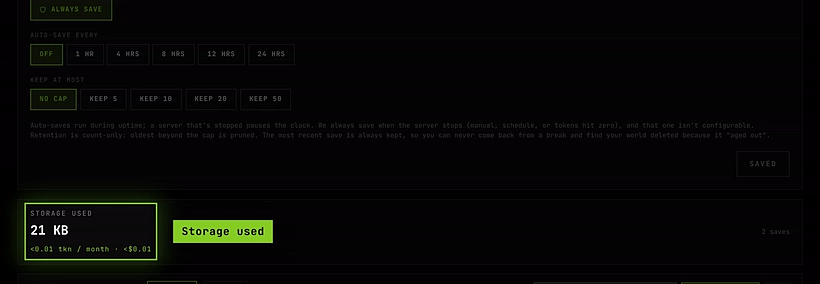
On the Saves tab. Open a server, then its Saves tab. Storage used shows the total for that server, split into Saves and Public files when it has both, with the monthly cost under it, like about 0.42 tokens a month ($0.00). Each save in the list shows its own size.
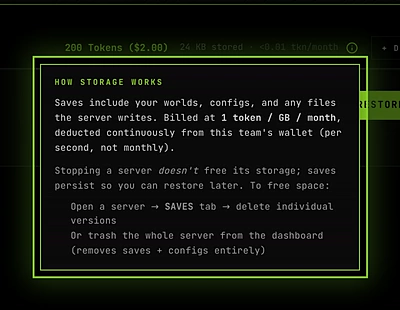
On the Servers tab. Each stopped server’s card shows how much it has saved, and the team’s line above the cards shows the team’s total stored and its monthly cost. Hover the small info icon next to it for How storage works, a short reminder of the rate and how to free space.

Before you take ownership. The file manager shows what a folder would cost per month before you take ownership of it.
Reduce your storage
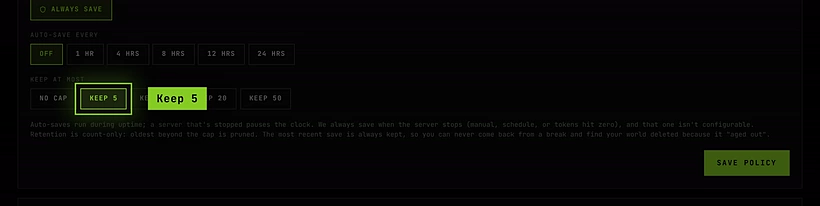
- Keep fewer saves. On the Saves tab, set Keep at most to 5 saves (or 10, 20, 50) and click Save policy. The oldest saves are removed automatically as new ones arrive; the most recent one is always kept. No limit keeps every save forever.
- Auto-save less often. A frequent Auto-save setting creates many saves. Pair it with Keep at most so they don’t pile up.
- Delete saves you don’t need. Click the trash icon on a save and confirm with Delete save. It can’t be undone. Your other saves stay.
- Give back folders you don’t need to own. In the file manager, Give back returns a folder to SLASHPLAY’s free, shared copy, and it stops counting as yours.
- Reset system changes. For Full Box servers, Reset system changes under Advanced → Launch & boot removes what you installed outside the game folder. The server must be stopped.
- Delete servers you’re done with. Deleting a server removes all its saves, so all its storage cost stops. Download a save first if you might want it back. See Delete a server.
Troubleshooting
My balance goes down even though nothing is running. That’s storage. Check each server’s Saves tab for Storage used. For most teams it’s a fraction of a token a month.
Stopping a server didn’t free any storage. Stopping creates a save, it doesn’t remove one. Saves stay so you can restore later. Delete saves or the server to free space.
Storage used is much bigger than my world. You probably keep many saves, or own large folders that are copied into each save. Lower Keep at most and give back folders you don’t need.