 /SLASHPLAY
Create your SLASHPLAY account
Sign in with Discord or Steam to create your SLASHPLAY account. You get a personal team with 6 free tokens, enough for about two hours of play.
Read the transcript
This audio was created with Boson AI's Higgs Audio: boson.ai/higgs-audio
There’s no sign-up form on SLASHPLAY. You sign in with an account you already have, Discord or Steam, and the first time you do, your SLASHPLAY account is created for you. It takes one click and about ten seconds.
You only need an account to run servers. Your friends can join your servers without one.
Before you start
You need a Discord account or a Steam account. Either one works, and you can connect the other one later.
Not sure which to pick?
- Discord is the natural choice if you’ll use SLASHPLAY with a Discord community, for example to let members start servers with
/server. - Steam is the natural choice if you mostly play Steam games like CS2 and don’t use Discord much.
Whichever you choose, connecting the second one later is recommended. See Sign-in methods.
Steps
-
Go to slashplay.gg/dashboard. When you’re signed out, this shows the sign-in page.
-
Click Sign in with Discord or Sign in with Steam.
-
Discord or Steam opens and asks you to confirm. Approve it. You type your password on Discord’s or Steam’s own site, never on SLASHPLAY.
-
You’re sent back to SLASHPLAY and land on the Home tab of your dashboard. Your account exists now.
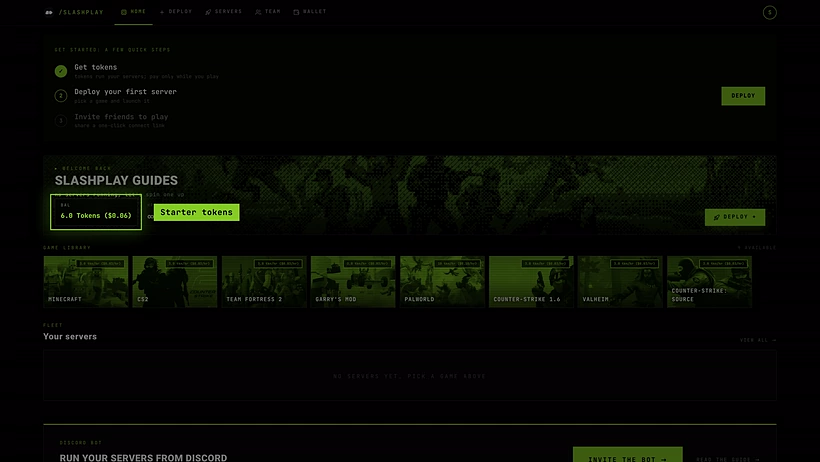
A new account lands on Home, with the 6 starter tokens
What the sign-in page looks like
The sign-in page is a big Game servers. headline with two buttons under it:
- Sign in with Discord, with the Discord logo.
- Sign in with Steam, with the Steam logo.
Under the buttons is the line From 3 tokens ($0.03) an hour, only while you play, and at the bottom a Back to site link. There’s nothing else to fill in: no email, no password, no username.

What you get
A new account comes with:
- A personal team, named after you, for example Alex’s Team. You’re its owner, so you can do everything on it. Servers always belong to a team, and this is the one your first servers go on. See Teams.
- 6 starter tokens on that team. At 3 tokens an hour, that’s about two hours on a small server, so you can try SLASHPLAY without paying anything. See How tokens work.
- An empty wallet. Your wallet is your personal token balance, where purchases land. You move tokens from it into a team to spend them. See Buy tokens.

Your name and profile picture come from the account you signed in with.
Connect your other account later
Once you’re signed in, you can add the second sign-in method from your account page: click your avatar in the top right, choose Account, then Connect next to Discord or Steam under Sign-in methods. After that you can sign in with either one and always reach the same account.
Connecting Steam is worth it if you play CS2: some features, such as using !rcon in chat on a CS2 server, recognise you by your Steam account. See Sign-in methods.
How it works
Signing in creates a session in your browser that lasts up to 30 days, so you won’t be asked again on the same browser for a while. Click your avatar and choose Sign out to end it early, for example on a shared computer.
If you’ve already used SLASHPLAY through the Discord bot, you have an account tied to your Discord already. Signing in with that same Discord account opens it, with its team and tokens.
Troubleshooting
“This Steam account is already linked to another SLASHPLAY account.” You tried to connect a Steam account that already belongs to a different SLASHPLAY account, often one you created by accident by signing in with Steam while signed out. The same message exists for Discord. See Sign-in methods for how to fix it.
I signed in and I see a different team, or no servers. You probably signed in with the other method and created a second account. Sign out (avatar, then Sign out) and sign in with the method you used first.
The sign-in page keeps coming back. Your browser may be blocking cookies for slashplay.gg. Allow them, or try a private window, then sign in again.
I don’t have Discord or Steam. You need one of the two. A free Steam or Discord account is enough; you don’t have to own any games on it.