 /SLASHPLAY
Teams
How teams work on SLASHPLAY: a team owns servers and a token balance, members get roles, and you can belong to as many teams as you like.
Read the transcript
This audio was created with Boson AI's Higgs Audio: boson.ai/higgs-audio
On SLASHPLAY, servers don’t belong to a person. They belong to a team. A team is a small group with its own servers, its own token balance and a list of members, each with a role that decides what they may do. You play on your own through a team of one, and you play with friends, a club or a class through a team you share.
What a team holds
- Servers. Every server you deploy lands on a team. It stays there no matter who clicked Deploy: if that person leaves the team, the server stays behind and keeps working for everyone else.
- Tokens. A team has its own team balance, and every server on the team spends from it while it runs. Your personal wallet is separate: you buy tokens into your wallet, then move them into a team. See Fund a team.
- Members and roles. The person who creates a team is its owner and can do everything. Everyone else joins with an invite code and gets a role, from VIEW ONLY up to ADMIN. See Roles and permissions.
- A log and settings. The Log shows every server the team has run and what each one cost. Settings holds the name and a team-wide auto-stop limit.
- Discord connections. A team can be connected to one or more Discord servers, so members there can start and stop its servers with
/server. See Discord.
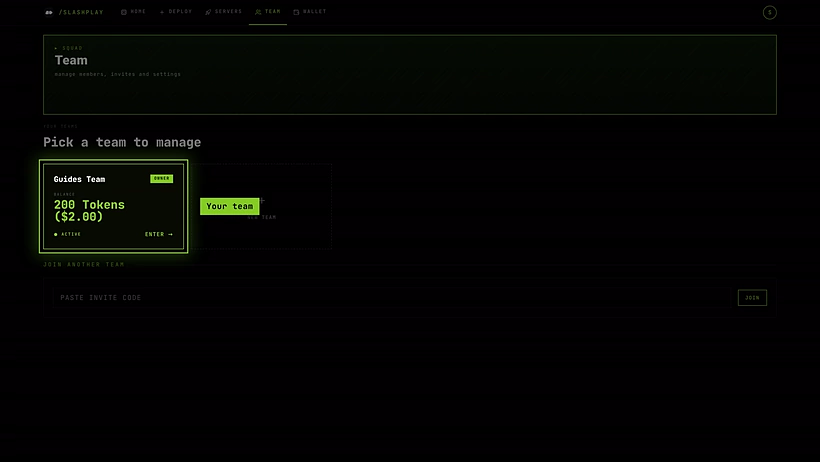
Your personal team
Every new account gets a team straight away, named after you, like Alex’s Team, with 6 starter tokens on it. You are its owner. That’s enough to play for about two hours on a small server before you need to buy tokens.
Most solo players never need anything else. Create more teams when you want to share servers and costs with other people, or keep projects apart.
Being in several teams
You can be in as many teams as you like: your own, a friend’s, a club’s. The Servers tab shows the servers from every team you’re on, grouped under each team’s name, so you always see the whole picture.
A few things follow one team at a time. That team is your active team, and it is simply the last team you opened on the Team tab:
- The Team tab’s members, invites and settings are always those of the team you have open.
- The role chip in the top bar (for example VIEW ONLY) describes what you can do on your active team.
- When you deploy and can deploy to more than one team, the deploy window asks which team should own and pay for the new server.
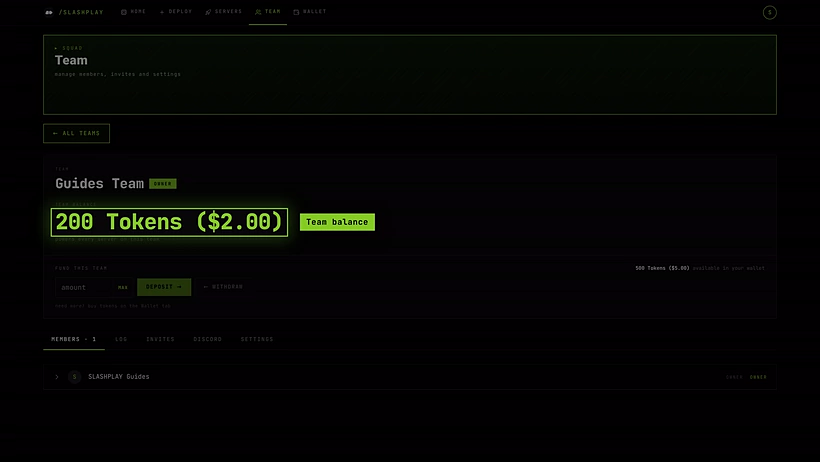
Opening a team makes it active. You never need to switch anything by hand.
Where to start
- Want to play with friends? Read Create and join a team, then Invite codes.
- Deciding who can do what? Roles and permissions explains the four roles and every permission.
- Server won’t start because the team has no tokens? See Fund a team.
- Want to know where the tokens went? Open the team log.
The pages below run from the basics to the settings only owners and admins need.