 /SLASHPLAY
Start, stop and restore
What each server status means and when you pay, how Save & Stop and Restore work, how to start from an older save, and what a server keeps between runs.
Read the transcript
This audio was created with Boson AI's Higgs Audio: boson.ai/higgs-audio
A SLASHPLAY server isn’t meant to run all the time. You start it when you play, stop it when you’re done, and bring it back next time exactly as you left it. This page explains the statuses a server goes through, what each costs, and every way to stop, restart and restore.
Server statuses
| Status | What’s happening | Billed per hour? |
|---|---|---|
| Starting | The server is booting. There’s no address yet. | Not while booting. If the boot succeeds, the time since Deploy or Start is billed; if it fails, nothing is. |
| Live | Up, with an address. Players can join. | Yes, from the team’s balance. |
| Saving | Saving the world and shutting down. | No. |
| Stopped | Off. Only its saved files remain. | No. Only storage (1 token per GB per month). |
| Crashed | The game went down on its own. The server usually stays open for 30 minutes so you can fix it in Files or the terminal, then saves and stops. See Crashes and debug mode. | Not if nobody changed the server by hand; if someone did, the 30 minutes are. A crash during boot is never billed. |
| Debug mode | Up with all its files, but the game isn’t launched, so there’s no address. See Debug mode. | Yes, like Live. |
Stop a server
When you’re done playing, stop the server. Stopping always saves first, so nothing is lost.
- On the card: click Stop on the live server in the Servers tab. It stops straight away, without asking; the button shows Saving… while it works.
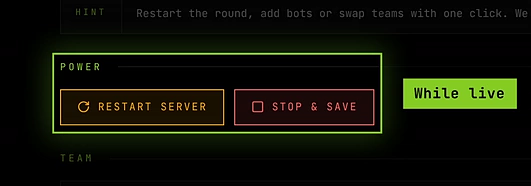
- On the server page: click Stop in the Power section of the General tab. This one asks you to confirm first.
The two buttons do exactly the same thing. Either way, the server saves its world and settings, shuts down, releases its address, and the hourly cost stops.

Stopping needs the Stop servers permission. See Roles and permissions.
Restart a server
Restart in the Power section (General tab, only while live) fully stops the game and boots it fresh. It takes about 30 seconds, keeps the same address and port, and works even when the game seems stuck. Use it to apply a changed join password or config files, or to clear a misbehaving server. It needs the Control servers permission.
A restart is not a stop: the server stays live and billed throughout.
Restore a stopped server
The server page has no way to start a stopped server. A stopped server comes back from its card:
- Open the Servers tab.
- Find the stopped server. Its card shows its size and hourly price, when its last session was, how much it has saved (for example ◆ 12 MB saved), and the tokens it has used.
- Click Start. The button shows Starting…, then the server appears as Starting, and usually goes Live within a minute.

Start uses the server’s newest verified save, which is marked Default on the Saves tab. Starting needs the Start servers permission, and the team needs at least one hour of tokens for the server’s size. If the team is out of tokens, a Fund & restore window lets you move tokens from your wallet first.
Start from a specific save
To go back to an older world, for example before something broke:
- Stop the server if it’s running. (Stopping saves the current world too, so nothing is lost.)
- Open the server page and go to the Saves tab.
- Click Restore on the save you want, and confirm.
The server starts with that world. If the save is marked SUSPECT or CORRUPT, you’re warned first, because starting from it may fail. See Saves and backups.
Boot times and hints
Most servers are live within a minute; CS2 usually takes 30 to 60 seconds. While a server boots, its card and page show a hint that changes as time passes:
| After | Hint |
|---|---|
| Start | booting, usually live within a minute |
| About 75 seconds | taking longer than usual; hang tight, we retry slow boots automatically |
| About 4 minutes | slow boot detected, auto-restarting the server and retrying, a few more minutes |
| About 9 minutes | this boot looks stuck; it will flip to crashed shortly, then just hit start again |

You don’t need to do anything while it boots. Stopping a slow boot halfway only cancels a retry that was likely to succeed. If it does end up crashed, you weren’t charged: click Start again.
What a server keeps between runs
Stopping throws away the running container, but the server itself keeps everything that makes it yours. After a restore it still has:
- Its saved world and game files from the last save.
- Its name.
- Deletion protection.
- Its size (or the new one, if you changed it while stopped).
- Its schedule, timezone and maximum run time.
- The CS2 player pause setting.
- Its launch args.
- Its join password (and whether protection is on) and its RCON password.
- Its Discord settings, including whether it’s muted.
- Folders you took ownership of in the file manager, and Full Box system changes.
- For Counter-Strike: Source, its installed mods.
What changes on every run: the address (and so the invite link), and the History tab gets a new row.
Troubleshooting
Start says Updating…. The game is being updated. Your world is safe; new starts pause for a few minutes.
Start says Not available. No machine has this game ready right now. Ask on Discord and we’ll sort it out.
The server crashed. The server page explains why and whether you’re charged, and the server stays open for 30 minutes so you can fix it. See Crashes and debug mode.
There’s no Start button on the server page. That’s right: use Start on the card in the Servers tab, or Restore a specific save from the Saves tab.