 /SLASHPLAY
Redeem a code
Turn a SLASHPLAY redeem code from a giveaway, promo or partner into free tokens in your wallet, then move them into a team to run your servers.
Read the transcript
This audio was created with Boson AI's Higgs Audio: boson.ai/higgs-audio
A redeem code is a short code that gives you free tokens. SLASHPLAY hands them out in giveaways, promotions and through partners. This page shows where to enter one, where the tokens go, and what each error message means. It takes ten seconds.
Before you start
- A SLASHPLAY account, signed in. See Create your account.
- The code. Redeem codes look like
ABCD-1234-EFGH: three groups of four characters.
Steps
- Open your dashboard and click Wallet in the top bar.
- Find Redeem a code.
- Type or paste your code into the box that says
XXXX-XXXX-XXXX. Letters are turned into capitals for you, so case doesn’t matter. - Click Claim, or press Enter.

When it works, a green line appears, for example +500 tokens ($5.00) added to your wallet! Wallet: 506 tokens ($5.06). The new balance is your wallet’s.
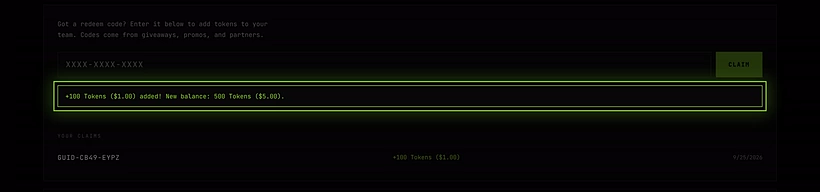
The code also appears under Your claims below the box, with the number of tokens and the date, so you can always check what you’ve redeemed.
Where the tokens go
Redeemed tokens land in your personal wallet, the same place bought tokens go. They don’t go straight to a team.
To use them on a server, move them into a team:
- Open the Team tab and enter the team.
- Under Fund this team, type an amount or click Max.
- Click Deposit.
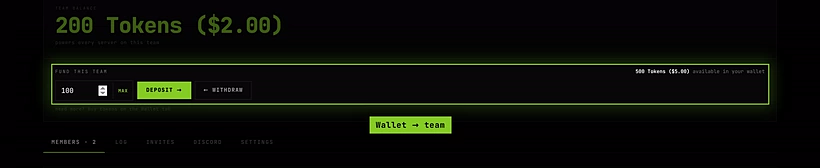
See Fund a team.
How it works
- Once per person. Each account can claim a given code only once. A code can have many claims in total, one per person, up to a limit set when it was made.
- Some codes are personal. A code can be reserved for one account, for example a prize for a giveaway winner. Nobody else can claim it.
- Some codes expire or get switched off after a campaign ends.
- Tokens never expire. Once a code is claimed, the tokens are yours to keep, like bought ones.
- Not a promotion code. Promotion codes give a discount when you pay with Stripe, and you enter them on the Stripe checkout page. Redeem codes give free tokens and go here. See Buy tokens.
Error messages
| Message | What it means |
|---|---|
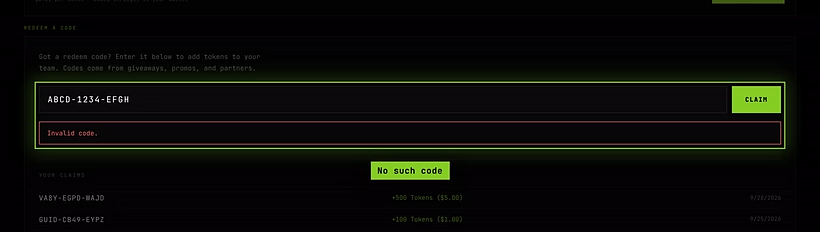
| Invalid code. | No code matches what you typed. Check each character, including the dashes. |
| This code is no longer active. | The code has been switched off. |
| This code has expired. | The code had an end date, and it has passed. |
| This code isn’t available for your account. | The code is reserved for someone else. |
| You’ve already claimed this code. | You’ve used it before. It’s listed under Your claims. |
| This code has been fully claimed. | Every claim has been used. Codes from popular giveaways go fast. |
Troubleshooting
I claimed a code but my server still says the team has no tokens. The tokens are in your wallet. Deposit them into the team the server belongs to.
I mixed up 0 and O, or 1 and I. Type the code again carefully, or copy and paste it from where you got it.
I got the code in Discord and nothing happens when I paste it into the bot. Codes are only redeemed on the Wallet tab of the dashboard, not through the bot.