 /SLASHPLAY
Start a Palworld server
Deploy a Palworld dedicated server on SLASHPLAY, pick the right size, join it by address from Palworld's multiplayer menu and stop it when you're done.
Read the transcript
This audio was created with Boson AI's Higgs Audio: boson.ai/higgs-audio
This guide takes you from zero to a live Palworld world for up to 32 players, then shows you how to stop it so it stops costing anything. The one thing to get right is the size: Palworld needs more power than most games, so read Step 3.
Before you start
- A SLASHPLAY account. Sign in at slashplay.gg/dashboard with Discord or Steam. See Create your account.
- Tokens on your team. A Palworld server on the recommended LARGE size costs 12 tokens an hour ($0.12), and you need at least one hour’s worth to deploy. New accounts start with 6 tokens, so you’ll need to buy tokens first. See How tokens work.
- Palworld installed on the computer you play on, for you and everyone who joins.
Steps
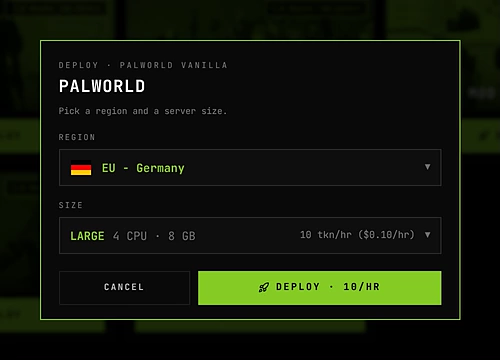
- Open Deploy. Sign in and click the Deploy tab in the top bar. Find Palworld and click Deploy on its card. The card shows 12 tokens an hour.
- Pick a region. Every server runs in EU - Germany today. The other regions are coming soon: choosing one lets you vote for it. See Regions.
- Pick LARGE. The size starts on SMALL, the smallest size Palworld can run on. Open Size and choose LARGE (4 CPU, 8 GB), the size Palworld is set up for. SMALL and MEDIUM are cheaper but give Palworld much less memory than it expects. There’s only one version, so the window doesn’t ask for one.
- Deploy. Click Deploy · 12/HR. You land on the Servers tab and the server shows Starting. The first start creates your world, so give it a couple of minutes.
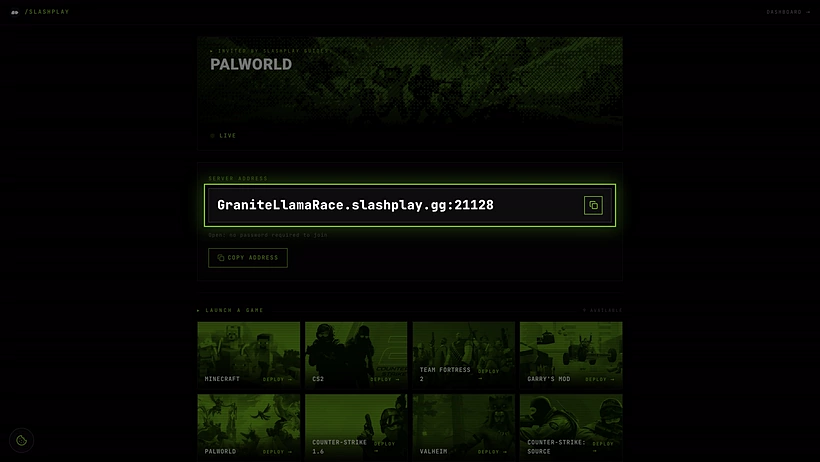
- Copy the address. When the card says Live, click Copy invite. You get the address, for example
GrandOspreyFeather.slashplay.gg:30057. - Join in Palworld (next section).
- Stop when you’re done. Click Stop on the card. Next time, press Start.

Join in Palworld
- Start Palworld and choose Join Multiplayer Game on the title screen.
- At the bottom of the server list, paste the address into the address box, including the
:portat the end. - Click Connect. If you turned on a join password, Palworld asks for it.
In the game, your server is called SlashPlay Palworld.
Invite your friends
Click Invite page on the card and send them that page’s URL. They don’t need a SLASHPLAY account. The invite page shows the server’s status and address with a Copy address button, and the password if you turned one on. There’s no launch button for Palworld: they copy the address and join from the Palworld menu as above. See Connecting and inviting.
To keep strangers out, turn on the join password on the General tab of the server page and restart. See Join passwords.
What happens next
While the server is live, your team’s balance pays for it by the minute, 12 tokens an hour on LARGE. Stop saves the world, shuts the server down and stops the hourly cost. Start brings the same world back at the same size, but with a new address and invite link, so share the new ones.
Troubleshooting
The server crashed and says it ran out of memory. It needs a bigger size. Stop it, pick LARGE or XLARGE, and restore. A crash while starting costs nothing. See Troubleshooting.
The deploy says “Not enough tokens”. You need at least one hour of the size you picked on the team balance: 12 tokens for LARGE. See Fund a team.
Palworld can’t connect to the server.
Check the card says Live, and that you pasted the whole address including :port. After a restore the address changes, so copy it again.
The server lags with many players. Stop it, switch to XLARGE, and restore.